02 — Providers
Visualize your provider mix.
See who actually takes the budget across Anthropic, OpenAI, Cursor and Gemini — and which way each trend is running.
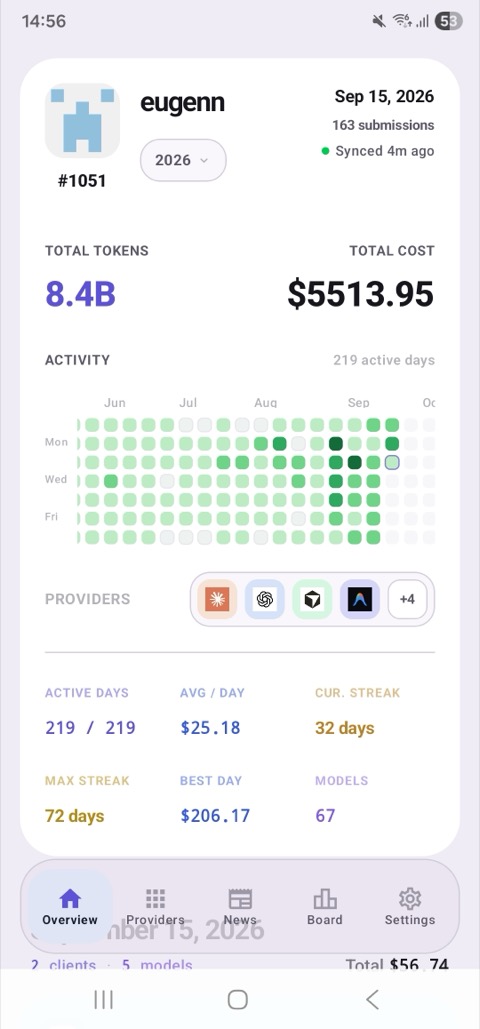
$5,513.95 across 388.2M tokens · 67 models
TokStats is the phone companion to tokscale — the open-source CLI for AI usage tracking. Pair once via QR code to see gorgeous trends, calendar heatmaps, and provider mixes directly on your home screen.
One view for your entire stack — tokscale scans them all locally
// Beautiful Analytics
Get a clear, visual digest of your AI developer habits. Spot trends, compare models, and track your activity streaks with a dashboard designed for high-agency engineers.
01 — Overview
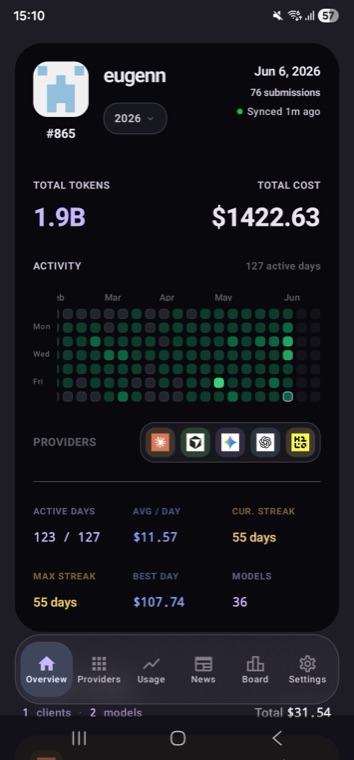
GitHub’s green squares stopped reflecting your real work the day coding agents started committing for you. What you actually do now is drive tokens across models — TokStats makes that your daily heatmap, streaks and all.
02 — Providers
See who actually takes the budget across Anthropic, OpenAI, Cursor and Gemini — and which way each trend is running.
$5,513.95 across 388.2M tokens · 67 models
03 — Provider detail
Tap a provider and the whole bill opens up — every model with its own cost, and the four token types broken out.
The cheapest token is the one you reuse.
04 — Leaderboard
Everyone syncing through tokscale shows up on one board — or make a private one and keep the comparison inside your team.
#412 of 2,167 builders
Top 19% by estimated spend · all-time · monthly · weekly
// AI News, filtered
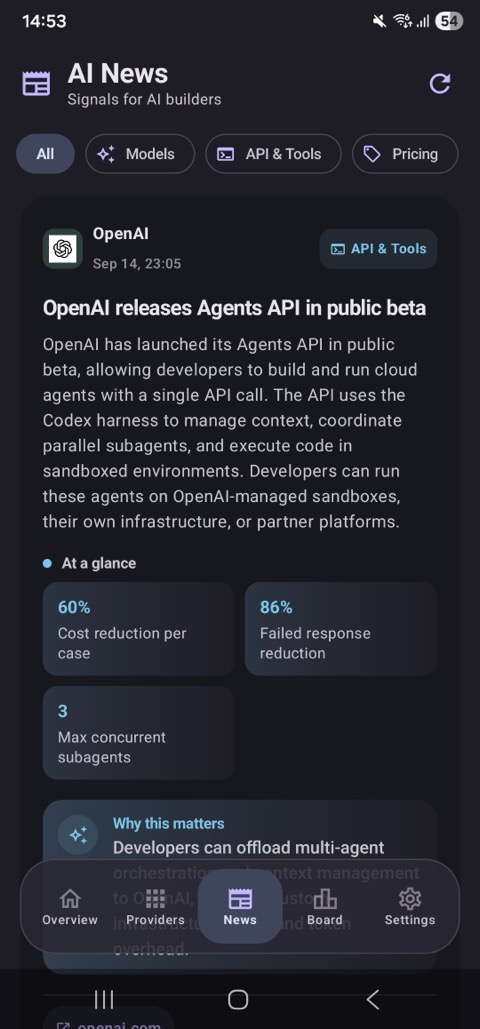
A curated feed for people who live at the frontier. New products, rate-limit changes, and pricing moves — each with an AI-written “Why it matters”, the numbers that matter at a glance, and a link to the source. No timeline to doomscroll.
Kilo
A 550B-parameter open-weights model, now available free for a limited time across Kilo Code’s terminal, VS Code, and JetBrains integrations.
✦ Why it matters
Frontier-class 550B open weights, tuned for agentic coding, with a 1M-token context window — at zero cost while the window is open.
65K max output tokens and a new Beta Interactions API with a default medium thinking-effort level.
✦ Why it matters
Configurable thinking effort lets you trade latency for depth per call — a direct lever on both quality and cost.
Provider update
A rolling weekly cap now sits alongside the existing 5-hour window for high-volume agent users.
✦ Why it matters
If you run agents all day, you’ll want to pace heavy jobs — TokStats’ streak and daily views show you exactly when you’re trending toward the cap.
Pricing change
Cache-read tokens drop further, rewarding workflows that reuse large system prompts and context.
✦ Why it matters
Your cache-hit rate is now worth even more. The provider breakdown surfaces cache reads and writes per model, so you can see the savings land.
// Get started
No web form, no copy-pasting API keys onto your phone. A local scan, a one-time GitHub sign-in & sync, and a QR — about a minute, start to finish.
One command finds every AI coding agent on your machine — all locally, no account needed yet.
$ npx tokscale@latest
✔ scanned 8 agents · 8.4B tokens · $5,513.95Sign in once with GitHub, then push your scan so the app can read it.
$ npx tokscale@latest login
✔ signed in as @you
$ npx tokscale@latest submit
✔ synced 8.4B tokensThis draws a QR holding just your token and username. Open TokStats, point your phone — synced in seconds.
$ npx tokscale@latest qrscan with TokStats → synced 1m ago
Device-to-device. The QR is read straight off the screen by the app — your token is never typed, pasted, or routed through our servers.
// Standing on tokscale
TokStats is the mobile companion to tokscale — a high-performance CLI and visualization dashboard for tracking token usage and cost across AI coding agents. The name nods to the Kardashev scale: tokens are the new energy. tokscale collects everything locally on your machine; TokStats gives those numbers a home screen.
tokscale is © Junho Yeo, MIT-licensed. TokStats is an independent companion app.
┌─ OVERVIEW ───────────────────────────┐
 total tokens   8.4B
 total cost     $5,513.95
 active days    219 / 219
 cur. streak    32 days
├─ SPEND MIX ──────────────────────────┤
 anthropic   ███████████     54%
 codex       ███████         35%
 cursor      █              5.5%
├─ TOKENS ─────────────────────────────┤
 input · output · cache · reasoning
└──────────────────────────────────────┘
$ npx tokscale@latest qr # pair your phone// Early access
Android is in closed testing on Google Play right now, with an iOS TestFlight round next. Leave the right email below and we’ll send a single invite when TokStats opens.
It has to be your Google account email
Closed testing on Google Play runs off a tester list, and Google adds people by their Google account — a Gmail address, or a Google Workspace address on your own domain. Use whichever account is signed in to the Play Store on the phone you’ll install TokStats on; any other address simply can’t be added to the tester list.
// Questions
Yes. tokscale collects your usage locally on your own machine, and your machine stays the source of truth. You decide what to sync to TokStats — your prompts and code are never read.
Think of TokStats as a fitness tracker, not a tax audit. Due to network timeouts, local caching variations, and model update overrides, some tokens might be estimated or omitted. It is built to give you a beautiful, high-fidelity view of your overall trends and usage habits, rather than a perfect accounting statement.
TokStats is a companion app, so the CLI is what gathers your numbers. Run npx tokscale@latest to scan locally, sign in with npx tokscale@latest login (GitHub) and push your data with npx tokscale@latest submit, then npx tokscale@latest qr and scan. That’s the whole setup.
Everything tokscale scans — 25+ agents including Claude Code, Cursor, Codex CLI, Gemini CLI, Copilot, OpenCode, Kilo, Zed, Warp, Amp, Kimi, Qwen, and more. New ones land in the CLI and show up in the app.
npx tokscale@latest qr renders your saved API token and username as a QR code on your terminal. TokStats reads it directly from the screen — the credential never passes through a browser or our servers.
For Android, the Google account email you use on Google Play — the account signed in to the Play Store on the phone you’ll install TokStats on. The beta runs as closed testing, which means Google grants access to a list of tester accounts, so we can only add a Google account: a Gmail address, or a Google Workspace address on your own domain (for example you@yourcompany.com, if that company uses Google). A non-Google address can’t be added to the tester list, and the opt-in link won’t work for it. If you signed up with the wrong one, just submit the right address — we’ll use the latest. For the iOS TestFlight round, any email works.
Android closed testing is live now via Google Play; iOS follows on TestFlight. Join the beta above with your Google account email and we’ll send one invite when TokStats opens.
The core — tokscale — is MIT-licensed and built by Junho Yeo. You can read every line at github.com/junhoyeo/tokscale.